


Cleaner - Clean Phone & VPN
4.614.23K Reviews
App Specs
- Version
- 2.6.26.2
- Updated On
- License
- Free
- Downloads
- 10,000,000+
- Developer
- TarrySoft
- Categories
- Tools
- Platform
- Android
Screenshots
 Analysis by AppCompare
I usually notice phone clutter at the least convenient time: when I’m trying to save a photo, open a document, or get through a day away from a charger. Cleaner - Clean Phone & VPN brings several maintenance tools together, so it may appeal if you’d rather check storage, files, and connection options in one place than keep separate utilities on your home screen. I’d treat it as a practical toolbox, though, not as a magic fix for every slow or full phone.
Where this all-in-one approach helps
Cleaner is a free tools app from TarrySoft, and its mix of phone-maintenance features is its main point of difference. It has a 4.6 average from around 410,000 ratings and over 10 million installs, so it has clearly found a broad audience. It’s rated for Everyone, but the combination of cleaning, file management, and VPN tools is most useful to people who want a few everyday utilities gathered under one roof.
That convenience has a trade-off. A phone’s built-in storage controls are often enough if all you need is to see what is taking up space, while a dedicated file manager may give you more focused tools for organizing documents. Cleaner makes more sense when you expect to move between different kinds of maintenance rather than when you want the deepest possible control over just one of them.
Network-dependent moments
The VPN makes connectivity part of the experience in a way the cleaning tools do not. It is aimed at situations such as using public Wi-Fi to check email or browse while you are out. I would think of it as a convenience for those moments, not a reason to stop being careful: a VPN does not make every website trustworthy or remove the need to protect accounts with strong sign-in practices.
Before relying on any VPN, I’d check how its connection behaves on the networks I actually use and whether it suits the services I need. For example, if I’m at a café and only need to read a message, a quick connection check is sensible before signing in to anything important. If the VPN is slow or interrupts a service, I would switch to a trusted connection rather than repeatedly retrying and assuming the app can solve a network problem.
Mobile contexts and everyday routines
A realistic use case is a busy afternoon when I’ve taken photos, downloaded a few files, and now need to send a document before heading home. I can review storage, use the file tools to locate what I need, and consider the VPN if I’m on public Wi-Fi. The benefit is having those tasks close together; the useful habit is to check what a cleanup action will remove instead of tapping through every suggestion automatically.
That last point matters because “junk” is not always obvious from a label alone. A cache can be recreated, but some temporary files may still be useful to an app or to a task in progress. I’d close or finish downloads and edits before cleaning, then review the result rather than treating a larger freed-space number as the only measure of success. For especially important photos and documents, I’d keep a separate backup instead of relying on a cleaner to protect them.
Worth Reading Before You Choose

EA SPORTS FC Mobile 26 Is a Bigger Football Game, but It Takes Time

Flipboard Shows What News Apps Must Do Beyond the Feed

Switching to Android Auto Means Rethinking Your Driving Routine

Google Calendar Makes a Crowded Week Easier to Manage

Ludo King Makes the Most of the Minutes Between Plans

Baby Panda World Brings Quick Play to Modern Phones, but Its Game Library Feels Busy
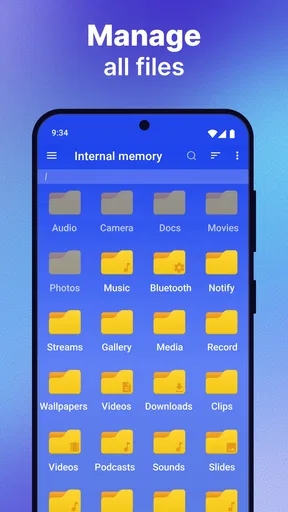
The app’s file organizer and duplicate remover are most valuable when clutter is the problem, not when you already have a tidy filing system. A practical approach is to use the organizer to find a specific document or group of photos first, then inspect possible duplicates before removing anything. Similar-looking pictures can be different versions, so a quick visual check is worth the extra moment. This workflow is safer than running a cleanup just because the phone has suggested one.
Failure, recovery, and realistic expectations
Cleaning apps can make a phone feel more orderly, but they cannot turn older hardware into a newer device or guarantee that every slowdown will disappear. If an app is lagging because of its own bug, a weak connection, or a demanding workload, deleting temporary files may not address the cause. I’d use Cleaner to investigate and manage clutter, then look at the specific app or network if the same problem returns.
The memory booster and battery saver also deserve a measured approach. Closing background activity may seem helpful, but repeatedly stopping apps can be counterproductive if the phone or those apps need to restart them soon afterward. I’d use these tools when I have a particular reason to check resource use, rather than making a routine of pressing a booster button whenever the screen feels busy. For battery drain, checking which app is responsible is more useful than assuming every background process is unnecessary.
If a cleanup does not produce the change you expected, pause before repeating it. Check the phone’s own storage and battery settings, restart the device if appropriate, and see whether the issue is limited to one app. That gives you a better chance of finding the cause than cycling through several maintenance buttons. Cleaner is a companion for routine checks, not a substitute for the operating system’s settings or a repair when hardware is at fault.
Data-conscious use while connected
The VPN is the feature most likely to affect how you use a mobile connection. When you are away from Wi-Fi, it is sensible to be aware that VPN traffic still uses your network connection, so I would reserve it for situations where I actually want that extra connection layer rather than leaving it on without thinking. On a metered plan, keeping an eye on general data use is a good habit regardless of which VPN you choose.
For large uploads, photo backups, or downloads, I’d first consider whether the task can wait for a connection I trust and prefer. A VPN does not create a stronger signal or make a limited data allowance larger. If a connection drops, wait until it is stable before starting a task that would be frustrating to repeat. This is a small distinction, but it keeps a privacy tool from being mistaken for a fix for poor reception.
How it compares with separate utilities
Compared with using Android’s built-in storage screen, Cleaner may feel more approachable if you want several maintenance options gathered together. The built-in tools are still a good choice for someone who wants fewer apps and direct access to system settings. A dedicated VPN app may suit people who prioritize detailed connection controls, while a specialist file manager is a better fit for frequent sorting, moving, or reviewing of files.
In other words, Cleaner’s advantage is breadth and convenience, not a promise that each tool will outperform every specialist alternative. If you rarely use a VPN or already have a file manager you trust, installing another utility may add little value. If you regularly switch between storage checks, file cleanup, and a VPN for public networks, having those options together can make routine upkeep less scattered.
Streamlined Clean-Up
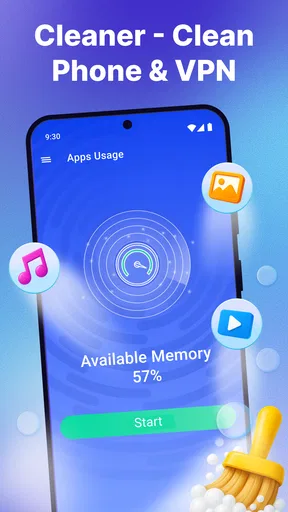
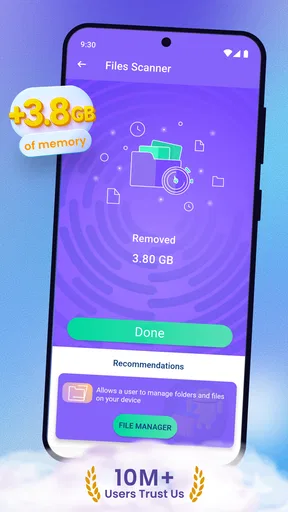
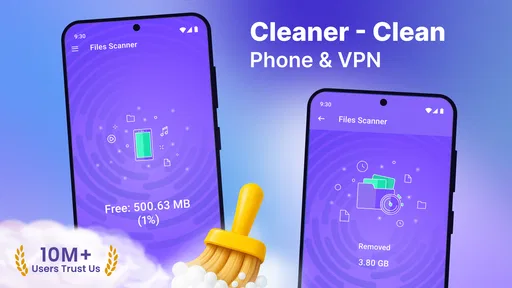
First things first, let’s talk about the core feature of the cleaner—the cleaning function. It’s like KonMari for your phone. Once you fire up the app, it dives right into analyzing your storage. It identifies junk files, unnecessary caches, and those pesky residual files that just hang around. With just a tap, you can clear out the clutter and instantly feel the difference in your device’s performance. It’s super satisfying to see all that space freed up.
The interface is intuitive and user-friendly. Even if you're not tech-savvy, you'll find the navigation a breeze. The app guides you through each step, ensuring you don’t accidentally delete something important. That’s a relief, right?
Efficient Memory Booster
Let’s not forget the memory booster feature. It’s like giving your phone a shot of espresso. By optimizing RAM usage, the app helps in speeding up processes and reducing lag time. Whether you’re gaming or multitasking with several apps open, this feature ensures everything runs smoother. It’s particularly handy if you’re using an older device that tends to slow down.
Secure VPN Service
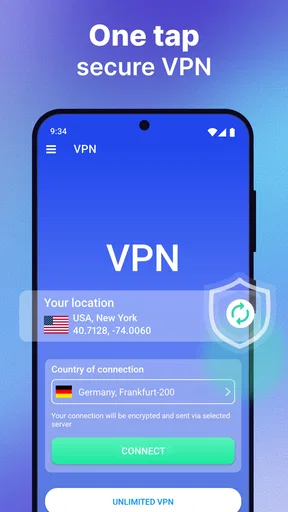
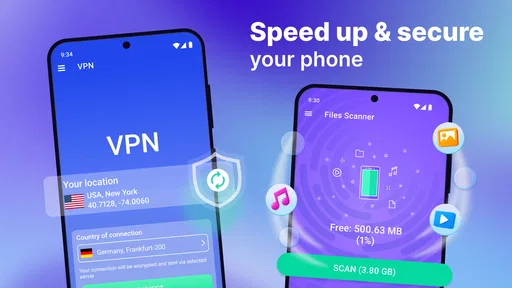
Now, here’s where things get interesting. The app isn’t just about cleaning; it also offers a secure VPN service. In today’s world, where privacy is paramount, having a VPN at your fingertips is a game-changer. Whether you’re browsing in a café or checking emails at the airport, the VPN encrypts your connection, keeping your data safe from prying eyes.
The VPN service is straightforward to set up. Just a couple of taps, and you’re ready to browse securely. Plus, it offers a decent range of server locations, so you can browse with peace of mind knowing your privacy is protected.
Battery Saver
I can't forget the battery saver feature. It's like finding that elusive treasure chest that you didn’t know you needed. By identifying apps that are draining your battery in the background, it helps prolong your battery life. Just imagine not having to frantically search for a charger every few hours. That’s a win in my book!
Real-Time Monitoring
One of the standout features has to be the real-time monitoring. It’s like having a health tracker but for your phone. You can view CPU, RAM, and battery usage in real-time, which is fantastic for identifying potential issues before they become problematic.
The app provides detailed reports which are easy to understand. It's perfect for those of us who like to keep a close eye on our device’s performance and make informed decisions.
Additional Perks
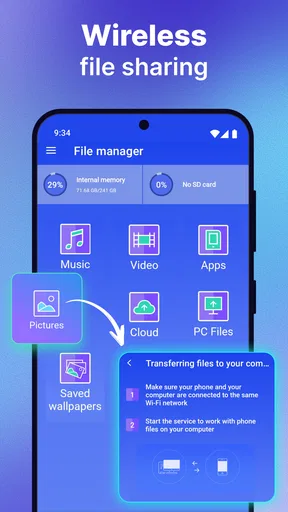
Beyond these core features, the app also offers some neat extras. There’s a file organizer to help you manage documents, photos, and videos efficiently. It’s like having a mini assistant to keep your digital life in order.
Plus, the app includes a duplicate file remover, which is a lifesaver. You’d be surprised how many duplicate files accumulate over time. Getting rid of them not only frees up space but also makes file management a lot easier.
All in all, Cleaner - Clean Phone & VPN is a versatile app that brings together essential tools for maintaining and optimizing your smartphone. Whether you’re looking to free up space, boost performance, or secure your data, this app has you covered.
In conclusion, if you’re like me and enjoy keeping your phone in top-notch condition without the hassle, this app is definitely worth checking out. It combines functionality with ease of use, making it a must-have for anyone looking to enhance their mobile experience. So, why not give it a shot and let your phone breathe a little easier?
Version, cost, and who should try it
The current version is 2.6.24, and it runs on Android 5.0 or later. The app is free to install, with in-app purchases ranging from $0.99 to $99.99 per item. I’d check the purchase details before confirming anything, especially if you only want the basic maintenance tools. The free entry point makes it easy to try, but it’s worth deciding what you need before paying for extras.
I’d recommend it most to someone who likes having storage cleanup, file organization, performance checks, and VPN access in one place and is comfortable reviewing suggested actions. I’d skip it if you prefer to keep your phone’s utilities to a minimum, already rely on separate tools you like, or expect a cleaner to solve persistent performance or connectivity problems on its own. My verdict is that its appeal is convenience: use the features selectively, keep an eye on what you remove, and treat the VPN as one part of sensible network habits rather than a cure-all.
Pros
- Intuitive interface for easy navigation.
- Efficient junk cleaner boosts performance.
- Integrated VPN for secure browsing.
- One-tap boost for quick optimization.
- Ad-free experience enhances usability.
Cons
- Requires premium for full features.
- VPN slows down internet speed.
- Occasional pop-up notifications.
- Limited language support.
- Battery consumption can be high.
FAQs for Cleaner - Clean Phone & VPN
What features does Cleaner - Clean Phone & VPN offer?
Cleaner - Clean Phone & VPN offers a range of features designed to optimize your device's performance. It includes tools for clearing cache and junk files, managing storage, and boosting RAM. Additionally, it provides a secure VPN service to protect your online privacy and bypass regional restrictions. The app aims to enhance your phone's speed and security simultaneously.
Is Cleaner - Clean Phone & VPN safe to use?
Yes, Cleaner - Clean Phone & VPN is designed with user safety in mind. It uses industry-standard encryption for its VPN service to ensure your online activities are private. The cleaning features safely remove unnecessary files without risking important data. Always download the app from official stores to avoid counterfeit versions.
Does the app require a subscription for all features?
Cleaner - Clean Phone & VPN offers both free and premium versions. While the basic cleaning tools are available for free, advanced features such as the VPN service and deeper cleaning functions may require a subscription. The premium version also removes ads, providing an uninterrupted experience for users who choose to upgrade.
Can the app improve my phone’s battery life?
Yes, Cleaner - Clean Phone & VPN can potentially improve your phone’s battery life by optimizing your device’s performance. By clearing cache and junk files, and managing apps running in the background, the app reduces unnecessary battery consumption. However, results can vary depending on individual usage patterns and settings.
Will the VPN slow down my internet connection?
Using the VPN feature in Cleaner - Clean Phone & VPN may slightly reduce your internet speed due to encryption overhead. However, the app is optimized to minimize this effect, providing a balance between security and performance. For most users, the speed difference is negligible, ensuring a smooth browsing experience.


